Monday, January 31, 2011

Centralized Configuration - Sharing one AgilePoint Configuration List among Site Collections

In SharePoint Integration v2, AgilePoint Configuration List is needed at the top level site to store the info for AgilePoint Server (URL, username, password, etc).
With this, you need to configure this list for each site collection you have.

If you have hundreds of site collections, configuring and maintaining hundreds AgilePoint Configuration List for site collections are just not efficient.

Here is a way you can configure a centralized AgilePoint Configuration List that can be shared by all the site collections in a SharePoint farm.

Insert below entries in the web.config file of your SharePoint web application.

<appSettings> 
<add key="APSettingsListName" value="AgilePoint Configuration" />
<add key="APSettingsSiteUrl" value="http://demo3:8081" />
<add key="APSettingsWebName" value="" />
</appSettings>


Where:

APSettingsListName = The name of the AgilePoint Settings List.


APSettingsSiteURL = The SharePoint SiteURL that contains the common AgilePoint Configuration List. The rest of the site collections will refer to this location and list as long as the individual AgilePoint Configuration list (which is auto-created in the site collection when this feature is activated) is deactivated or removed.


APSettingsWebName = If this field is left blank, this means that the AgilePoint Configuration List is located at the top-level site. A value would indicate the Sub site name.


After this, you might just goes ahead to activate the "AgilePoint Process Launcher" feature, so that process can be triggered for items inserted into the SharePoint. But, you will run into below error:


image


image


To fix this, you may remove the ActivationDependencies node (see below) from the feature file of "AgilePoint Process Launcher". The feature file is located at C:\Program Files\Common Files\Microsoft Shared\Web Server Extensions\14\TEMPLATE\FEATURES\AgilePointWFIntegration\feature.xml.


    <ActivationDependencies>


        <ActivationDependency FeatureId="A379136F-8742-4f0c-9D5A-9310A4D2B80C"/>


       </ActivationDependencies>


This shall let you to activate the "AgilePoint Process Launcher" feature without needing to activate the 'AgilePoint Configuration List' feature on each site collections.


Friday, January 28, 2011

SharePoint Integration Upgrade - A deployment or retraction is already under way

This is for both of the cases of upgrading SharePoint Integration using the upgrade installer and also manually using the stsadm tool. If you see error below, that means there are previously run command to upgrade the solution files for SharePoint Integration, but the deployment was not completed for certain reason and stuck at that point.

Below is the log of upgrading using the upgrade installer. It's the same error for the case of upgrading manually using the stsadm tool.

1/28/2011 11:05:07 AM>>Updating SharePoint Integration v2... started
1/28/2011 11:05:07 AM>>StartDeployment start
1/28/2011 11:05:07 AM>>SharePoint Integration v2: Information, Upgrading solution Ascentn.SharePoint.SettingsList.wsp in SharePoint ...
1/28/2011 11:05:07 AM>>stsAdmProcess.StartInfo.Arguments: -o upgradesolution -name Ascentn.SharePoint.SettingsList.wsp -filename "C:\Documents and Settings\Administrator\Local Settings\Temp\ckz_1OML\NET20\SharePointv2\Ascentn.SharePoint.SettingsList.wsp" -immediate -allowgacdeployment
1/28/2011 11:05:23 AM>>SharePoint Integration v2: Error, A deployment or retraction is already under way for the solution "ascentn.sharepoint.settingslist.wsp", and only one deployment or retraction at a time is supported.

You may use the following steps to cancel the uncompleted jobs, then run the upgrade installer again or run the upgradesolution command again if upgrade manually.

Run enumdeployments command to get the job IDs:

stsadm -o enumdeployments

The return string looks like this:

<Deployments Count="4"> 
<Deployment JobId="71d06ccb-f5d9-4ae5-8caf-7223130c2a70">
<Title>Windows SharePoint Services Solution Deployment for "ascentn.sharepoint.listform.wsp"</Title>
<Type>Upgrade</Type>
<State>Failed</State>
<File>ascentn.sharepoint.listform.wsp</File>
<ServerType>Front-end Web server</ServerType>
</Deployment>
<Deployment JobId="962557ba-21e7-4739-9b6e-3e38446b477d">
<Title>Windows SharePoint Services Solution Deployment for "ascentn.sharepoint.settingslist.wsp"</Title>
<Type>Upgrade</Type>
<State>Failed</State>
<File>ascentn.sharepoint.settingslist.wsp</File>
<ServerType>Front-end Web server</ServerType>
</Deployment>
<Deployment JobId="add88985-159a-493f-a6f3-26f8918f6517">
<Title>Windows SharePoint Services Solution Deployment for "ascentn.sharepoint.webparts.wsp"</Title>
<Type>Upgrade</Type>
<State>Failed</State>
<File>ascentn.sharepoint.webparts.wsp</File>
<ServerType>Front-end Web server</ServerType>
</Deployment>
<Deployment JobId="08fb8dac-a290-4466-966d-b06fab38b465">
<Title>Windows SharePoint Services Solution Deployment for "ascentn.sharepoint.wfintegration.wsp"</Title>
<Type>Upgrade</Type>
<State>Failed</State>
<File>ascentn.sharepoint.wfintegration.wsp</File>
<ServerType>Front-end Web server</ServerType>
</Deployment>
</Deployments>


Then, run the canceldeployment command to cancel all the uncompleted jobs related to AgilePoint SharePoint Integration.


stsadm -o canceldeployment -id "GUID jobId"


After this, you may run the enumdeployments command again to check the jobs are canceled.


stsadm -o enumdeployments


At this point, you are good to run the upgrade installer or upgradesolution command again.

Friday, January 21, 2011

SPSecurity.RunWithElevatedPrivilages Error


If you are getting the 'SPSecurity.RunWithElevatedPrivilages()' error at SharePoint (see picture below), that means the application pool identity of your SharePoint web application does not have enough privilege to write to the event viewer on your SharePoint machine. Your network administrator shall be able to help you with this. If you need more details, the Pre-Installation Guide and Installation provide you the full details for SharePoint installation. This error is not caused by AgilePoint.

image

Thursday, January 20, 2011

Clustering Server Manager (CSM) Implementation - Network Load Balancing

We had made things a bit more seamless and easy in 5.0 SP1 release as far as cluster is concerned so I have listed both approaches based on whether you want to stay on 5.0 release of AgilePoint or want to upgrade to 5.0 SP1.

Irrespective of which option you go for make sure following things are done in your environment which are pre requisites of any NLB app

1) Make sure web.config of AgilePoint Server and Enterprise Manager has SessionState set to SQLServer. For example,

<sessionState mode="SQLServer"

regenerateExpiredSessionId="true"

timeout="30"

sqlConnectionString="Server=<server-name>;Trusted_Connection=True;"

stateNetworkTimeout="30"/>

2) Ping from one machine to another, i.e. ping machine A from machine B and from B to A

3) Make sure firewall is off on both machine

Option 1

If your CSM component needs to be installed on separate server outside AP server farm. This is what we supported till 5.0

1) Install AgilePoint CSM component on an server which is outside AgilePoint farm servers. It has a very small footprint so can be installed on any existing server like database server. It does not need dedicated machine of its own.

2) Activate both AgilePoint servers with NLB keys.

3) Open AgilePoint Server Configuration utility. You will start seeing a new field  for cluster server manager. You need to replace machine name with name of machine where you installed CSM component. Save configuration and reset IIS. Do this on both machines.

image

4) Once you have done step 3 on both servers, you can go to machine where you installed CSM and we provide a utility there to test your NLB is working fine or not. If you have an old installation, your folder name is 'Ascentn Corp'. If you have new installation, then 'AgilePoint' will be your folder name. I have an old installation in picture below. Once you run this as shown below you should get response from both machines. If you see that it means NLB is fine.
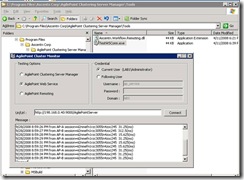
clip_image004


Option 2

We were getting request from customers that can they install AgilePoint CSM on same machine as AgilePoint server so that they do not have to worry about managing it on other machine. In 5.0 SP1, we have added a new logic such that it can be hosted on same machine. Here is what you need to do.

1) Using 5.0 installer, install AgilePoint CSM on both AgilePoint servers. Use NLB keys for activation of both servers.

2) Upgrade both machines to AgilePoint 5.0 SP1 by running the upgrade package. This is a straight forward upgrade.

3) There is an entry to be made in the registry to point the CSM to AgilePoint database. This contains a connection string. In this case you do not have to set cluster server manager machine name as done in step 3 of option 1. The reason is that CSM is on that machine so it does not need this information separately.

You would need to manually create one registry key for option 2 since CSM is going to be on same machine as AP server. Here is the key which need to be created

clip_image006

In this registry value copy AgilePoint Database connection string to CSM registry. You can get this value from your netflow.cfg file. Please take note of the DB provided in front section of the connection string, e.g. MSSQLDatabase: connection lifetime=5;min pool size=10;server=T410-1;database=AgilePoint47;trusted_Connection=yes

4) Click ok on AgilePoint Configuration Utility and reset IIS. This needs to be done on both machines. Please note that in this case you should not see the cluster server manager textbox in AP configuration utility as in option 1. If you see that you need to delete one entry from registry or netflow.cfg file.

5) After making above entry on both machines, restart CSM (windows service on both machine). Please make sure that the logon identity for CSM windows service is having DBO privileges on AgilePoint database.

· Query database and make the CSM works, i.e. you can see WF_CLSUTER_SERVER_URI has one record.
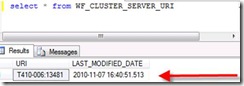
clip_image008

If you see URL=machineA:13841, stop CSM window service on machine A and query again. You will see URL will be MachineB:13841.

· Now make sure both machine windows services are started. Run iisreset and check the AgilePont Server log file.

One machine will have:

010-11-07 16:51:12.688 >>> Initialize Cluster Event Dispatcher, uri=tcp://T410-006:13481/192.168.0.24/55a1a2b7-46cb-4148-a15f-a4e2a18d1b44:False

The other machine have:

2010-11-07 16:51:02.564 >>> Initialize Cluster Event Dispatcher, uri=tcp://T410-006:13481/192.168.0.24/97adaa57-8d82-47e9-aafb-f50c0c667a0c:True

Here, the 'True' means it is the master server.

6) Now use the ping utility to test for NLB as done in option 1

Both options do not take much time. Only difference is whether you want to install CSM on same machine or different machine.

AgileForms - Beta or Released Version?

How do I know if the AgileForms installed in my machine is the beta version or the released version?

If you have below registry key, that means you have the released version of AgileForms (v5.0 SP1). If this key does not exist in your environment, that means you have the beta version of AgileForms. It is recommended that you uninstall the beta version and install the release version. There is no upgrade from the beta version to the released version for now.

HKEY_LOCAL_MACHINE\SOFTWARE\BWS\AFEControl\AFVersion

image

Wednesday, January 19, 2011

Update InfoPath Activity Suspended

A customer is working with InfoPath form with attachment. When the attachment size grows bigger and bigger, the process is suspended at the Update InfoPath Activity. See picture below.

image

I usually do not recommend to attach large attachment to InfoPath, because the whole xml of InfoPath is submitted to AgilePoint every time the user completes the task. The larger the attachment, the slower the data transfer between SharePoint and AgilePoint.

For large attachment, I suggest to keep that attachment file in a library in SharePoint, then keep the link of that attachment in the InfoPath form. Then user can still open up the attachment from the InfoPath form.

The other thing can be looked into is the maxRequestlength setting in the web.config of AgilePoint and SharePoint. See this KB. But this will not help much on the speed/performance if the file is too large. The bandwidth of the network actually becomes the bottleneck in this case.

AgilePoint ASP.NET - base.CompleteWorkItem() not working

AgilePoint Web Project provides a framework for your to develop your custom workflow web application with AgilePoint capability. In come cases, the base.CompleteWorkItem() at your aspx page does not complete the work items. Here is an alternative to call the CompleteWorkItem method.

Here is your code which calls the base.CompleteWorkItem():

private void SubmitClick(bool Approved)

{

NameValue[] nvs = new NameValue[] { new NameValue("/pd:myFields/pd:Approval", Approved) };

base.SetCustomAttrs((string)base.GetWorkObjectID(), nvs);

base.CompleteWorkItem();

....

}

You can override the CompleteWorkItem() method and call --> this.CompleteWorkItem() :

Sample Override

You may call the CompleteWorkItem() method from the WFWorkflowService object (it's represented by the variable api below) directly. Another benefit to do this is, you may inspect the WFEvent object returned from api.CompleteWorkItem() to see if it is failed or succeeded. (Note: base.CompleteWorkItem() return void, so you can't inspect the event status)

Please note that the loop in below code that waits for 1 second and checks the event status again is for testing or debugging purpose only. If you put this code in production every time you call the CompleteWorkItem() method, it might cost performance issue.

protected override void CompleteWorkItem()

{

// base.CompleteWorkItem(); <-- do not call the base method

if (base.GetWorkItemID() == null)

{

Logger.WriteLine("Lost Work item ID from ViewState[WID]...");

// ToDo: You might want to provide an alert message here

}

base.WriteBindingControls();

if (base.GetAPI() == null)

{

Logger.WriteLine("Lost API from the SessionState...");

// ToDo: You might want to provide an alert message here

}

IWFWorkflowService api = base.GetAPI();

WFEvent evt = api.CompleteWorkItem(base.GetWorkItemID()); // Submit Complete Work Item

System.Threading.Thread.Sleep(1000); // 1 sec wait

WFEvent evtUpdt = api.GetEvent(evt.EventID);

while (evtUpdt.Status == WFEvent.SENT) // Inspect event status

{

System.Threading.Thread.Sleep(1000); // 1 sec wait

evtUpdt = api.GetEvent(evtUpdt.EventID);

}

if (evtUpdt.Status == WFEvent.FAILED)

{

Logger.WriteLine("Failed Work Item Completion request xxxxx - Check AP Server Log");

// Potential errors that can be gleaned from the AP Server Log are:

// 1. Ownership of the workitem - requester is different from the assigned user

// i.e. Failed to complete the task due to ownership with Request User={0} and Assigned User={1}

// 2. UserID for the work item is null

// i.e. Failed to complete the task with WorkItemID={0} because there is no assigned user.

// 3. Work Item has null Activity Instance ID

// i.e. Failed to create work item because the activity is not found with process='{0}',ActivityID={1}, and Sender='{2}'

// 4. this work item depends on child work items

// i.e. Failed to complete work item because he work item is trying to be completed depends on child work item(s), Process='{0},{1}/{2}/ID={3}' WorkItemID='{4}', Child WorkItemID='{5}'

}

else if (evtUpdt.Status == WFEvent.PROCESSED)

{

Logger.WriteLine("Processed Work Item Completion request xxxxx");

}

}